Underwriting numbersyou can defend.
PropLens turns your T-12s and rent rolls into an underwriting-ready summary you can trust: accurate NOI, occupancy, and rent metrics, ready in minutes instead of hours of re-keying.
Free during beta · No credit card · Your data never trains AI models
Validated across 0+ real PMS documents
Upload. Verify. Underwrite.
From raw operating statement to a defensible worksheet in three steps.
Upload
Drop in your T-12 and rent roll exactly as the PMS exported them — Excel, CSV, or PDF. Excel files process in under 30 seconds; PDFs take 1–3 minutes.
Verified extraction
PropLens extracts every line item and unit, then compares its own totals against the totals printed in the document. Matches are marked verified; differences are flagged in amber for review.
Editable worksheet
Review NOI, occupancy, loss-to-lease, and lease expirations. Click any cell to adjust it — your edits layer on top of the extracted data and can always be reverted. Export to Excel when you're done.
Inside PropLens
Scroll through a real deal: extraction, verification, and the underwriting model.
The T-12 dashboard
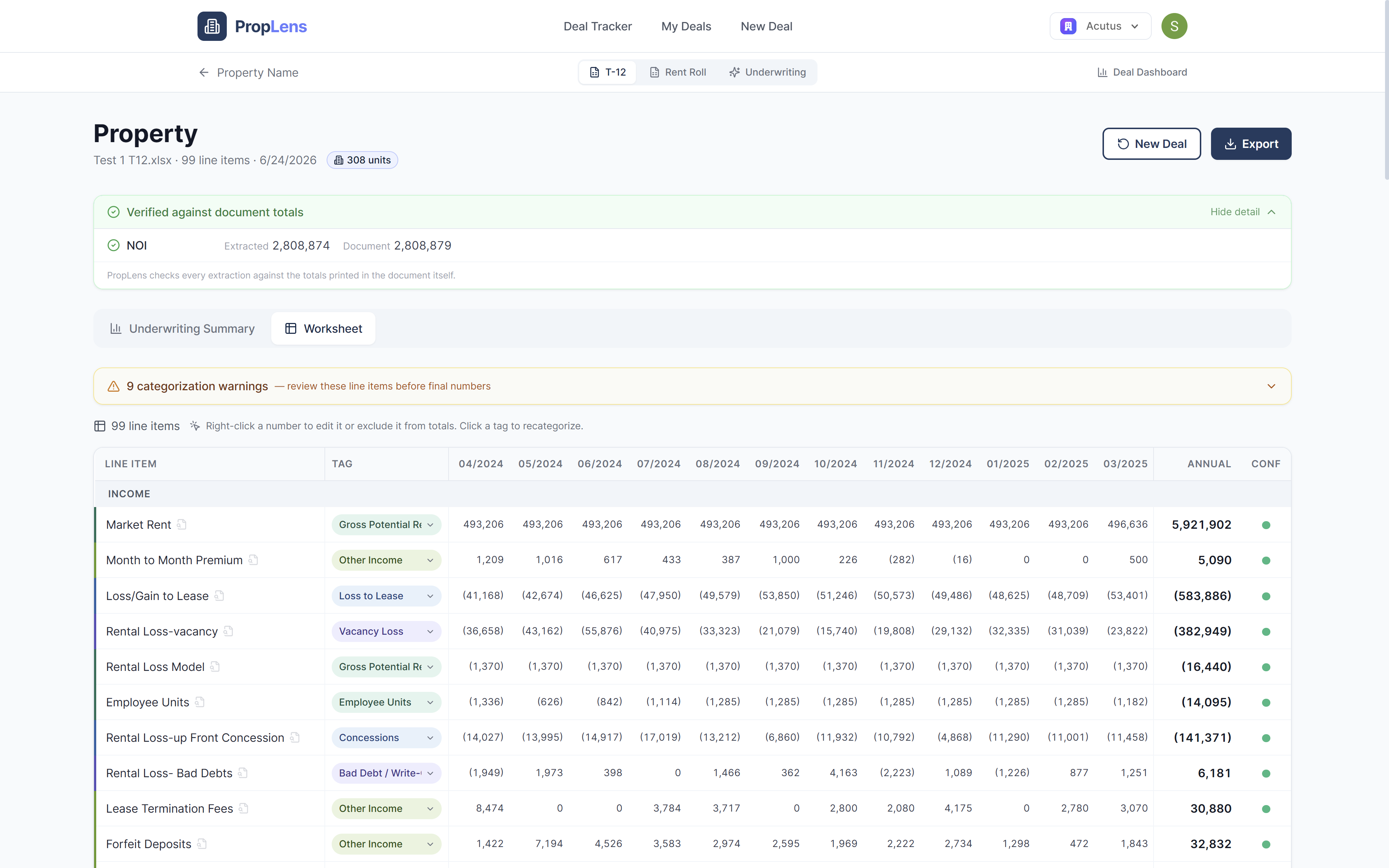
Income, expenses, and NOI at a glance, with every total checked against the document's own.
The worksheet
Every line item, click-to-edit and color-coded by category. Your edits layer on top and never overwrite the extraction.
Rent roll dashboard
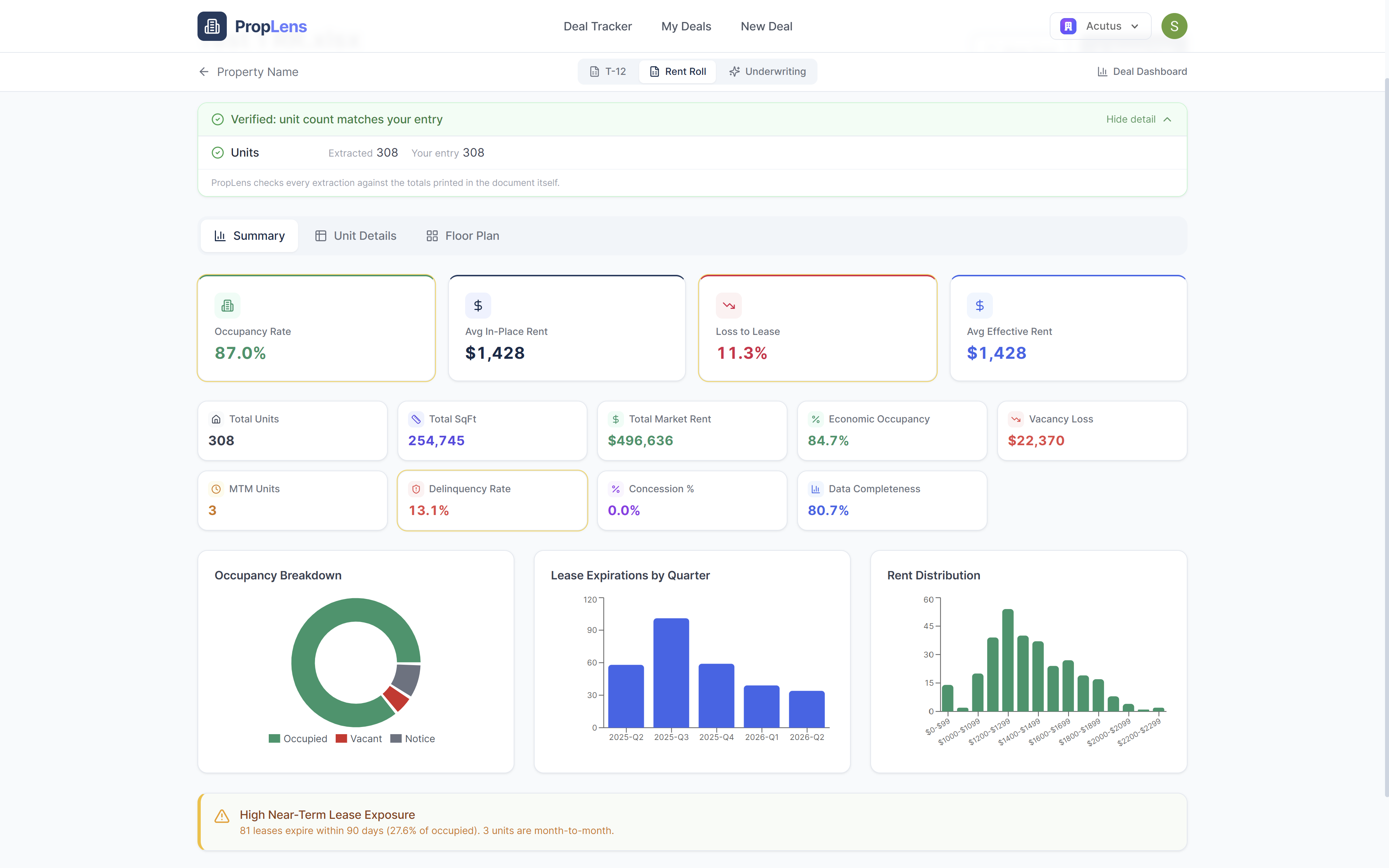
Unit-level data normalized into occupancy, WALT, loss-to-lease, and rent-per-square-foot.
Underwriting model
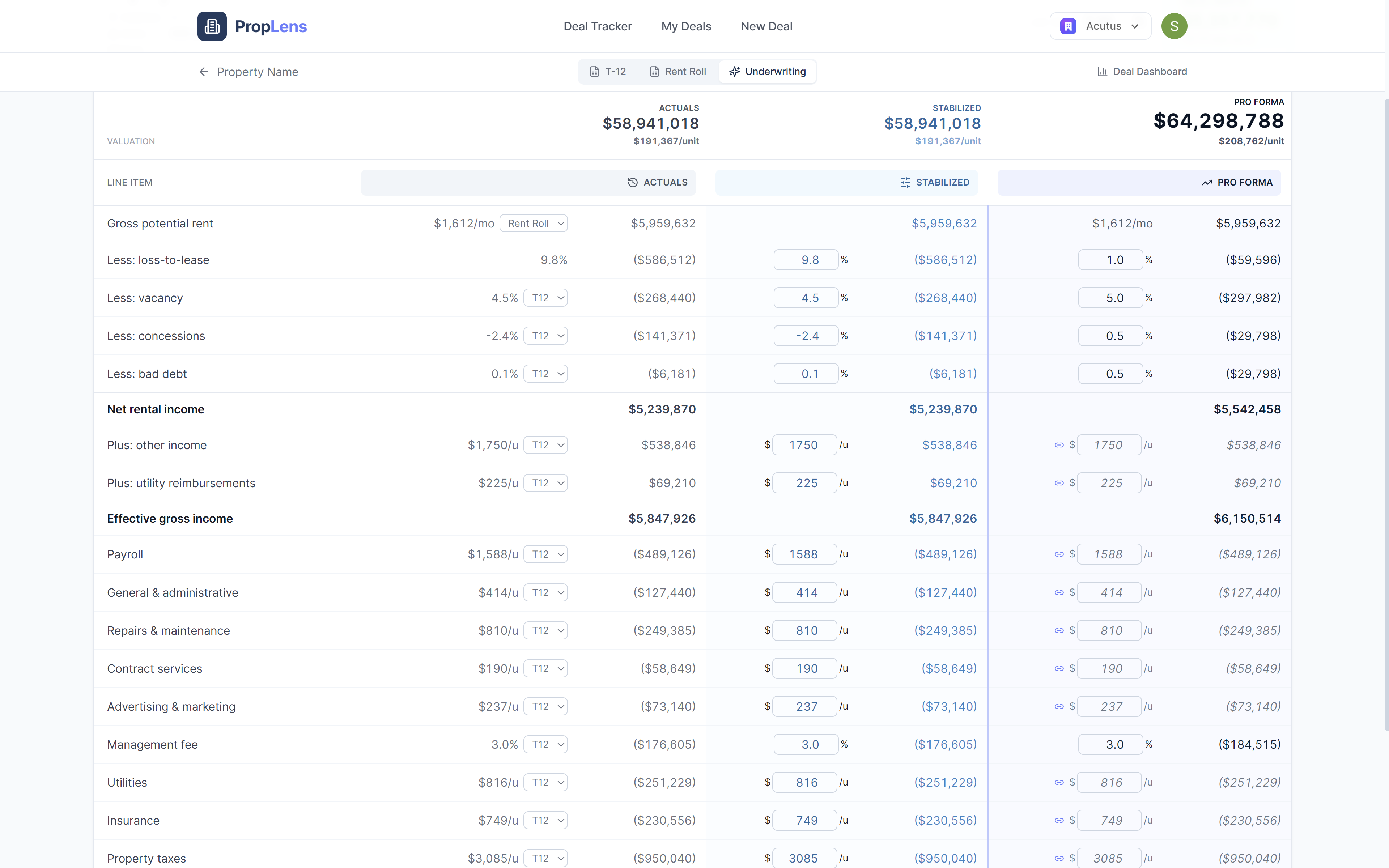
AS-IS, normalized, and pro-forma side by side, with cap-rate valuation off the verified numbers.
The T-12 dashboard
Income, expenses, and NOI at a glance, with every total checked against the document's own.
The worksheet
Every line item, click-to-edit and color-coded by category. Your edits layer on top and never overwrite the extraction.
Rent roll dashboard
Unit-level data normalized into occupancy, WALT, loss-to-lease, and rent-per-square-foot.
Underwriting model
AS-IS, normalized, and pro-forma side by side, with cap-rate valuation off the verified numbers.
Extraction you don’t have to take on faith
Most documents already state their own totals — the unit count on a rent roll summary, the income and expense totals on a T-12. PropLens reads those too, and reconciles its extraction against them on every run.
- Rent rolls: unit count, total square footage, and market rent checked against the document's summary rows.
- T-12s: total income, total expense, and NOI checked against the statement's own grand totals.
- Anything that doesn't reconcile is flagged in amber — on the dashboard and on the affected worksheet totals.
- When no comparable total can be found in the document, PropLens says exactly that instead of implying a check it didn't make.
The spec sheet
Straight answers to the questions analysts actually ask.
Which property management systems are supported?
Yardi, RealPage, OneSite, Entrata, MRI, AppFolio — and ad-hoc spreadsheets that didn't come from any PMS at all. If the columns are recognizable, PropLens will find them.
What file types can I upload?
.xlsx, .xls, .csv, and .pdf — including scanned PDFs. Excel and CSV files usually process in under 30 seconds; PDFs take 1–3 minutes because we extract the tables page by page.
Can I edit what the AI extracted?
Yes — every cell in the worksheet is click-to-edit. Your edits are saved as overrides layered on top of the extracted data, so nothing is ever overwritten: you can revert any single cell, or all of them, back to the original extracted value at any time.
How do I know the numbers are right?
PropLens checks its own work. Every extraction is compared against the totals printed in the document itself — unit count, square footage, and rent totals for rent rolls; income, expense, and NOI totals for T-12s. Matches are marked verified; any difference is flagged in amber for your review instead of being hidden. When we can't find a comparable total in the document, we say so plainly instead of implying a check we didn't make.
Is my data used to train AI models?
No. Never.
Run your next deal through PropLens
Upload the T-12 and rent roll you’re working on right now and see every number checked against the document itself.
Free during beta · No credit card · Your data never trains AI models